KSeF gate (black-box)
KSeF Gateway Integration Documentation (black-box)
for the National e-Invoice System (KSeF 2.0)
Attention! The KSeF Gateway (black-box) component provides the operations described in this chapter, which are dedicated to the component, as well as all the operations described in the chapter KSEF REST APIA company that decides to integrate its system using the KSeF Gateway (black-box) independently decides how to use individual operations.
Components
For the purposes of this documentation, three basic components have been adopted that participate in business processes related to the management of KSeF invoices using the KSeF Gateway:
 Diagram: Components
Calling system
The Client's IT system that communicates with KSeF 2.0 via the KSeF Gateway (black-box) implemented on-premise (locally at the client's premises).
National e-Invoice System (KSeF 2.0)
National e-Invoice System is a central repository of structured electronic invoices that is managed and maintained by the Ministry of Finance.
KSeF gate (black-box)
A technical component implemented in the Docker architecture or as a VM (virtual machine), providing basic functionalities related to sending invoices to KSeF. The KSeF gateway (black box) is implemented and maintained within the client's infrastructure.
Operations
The chapter contains a description of the operations available within the KSeF Gateway (black-box).
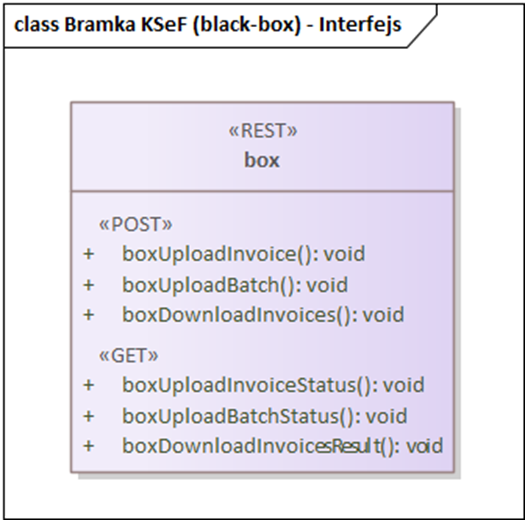
Diagram: Interface for the KSeF Gateway (black-box) with available methods
boxUploadInvoice
This method allows you to send a single invoice to KSeF. Click on the operation name to go to Swagger UI.
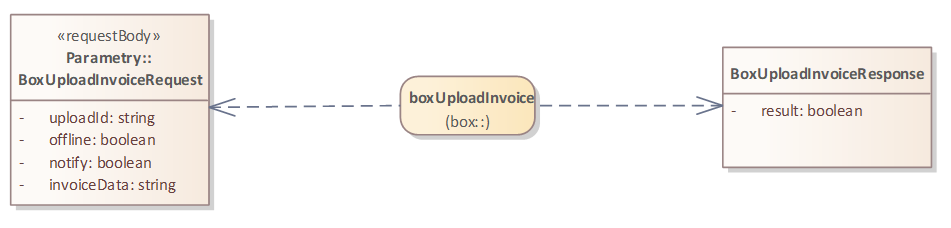
Diagram: boxUploadInvoice
BoxUploadInvoiceRequest
The class is described in the chapter BoxUploadInvoiceRequest.
BoxUploadInvoiceResponse
The class represents a response informing about the status of an invoice sent to the KSeF Gateway (black-box).
result : boolean – Attribute value true, informs about the correct receipt of the entire invoice package by the KSeF Gateway (black-box).
boxUploadInvoiceStatus
This method allows you to check the status of a single invoice sent to KSeF. Click on the operation name to go to Swagger UI.
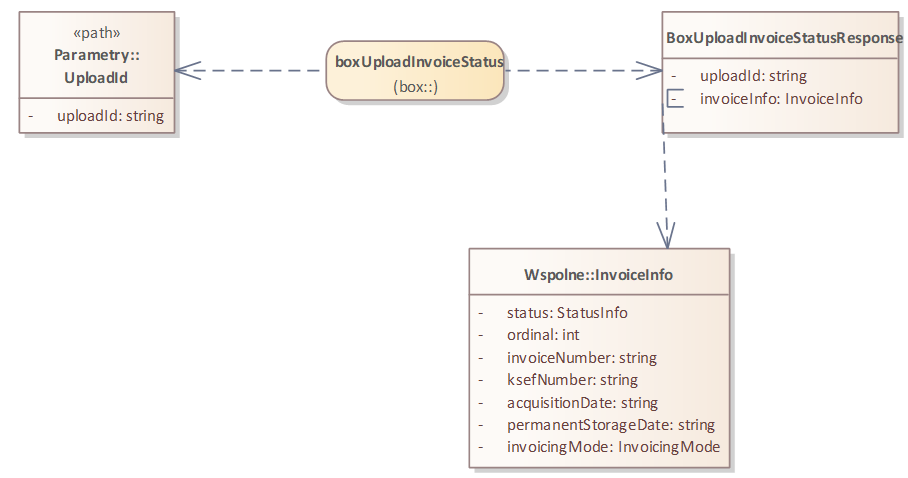
Diagram: boxUploadInvoiceStatus
UploadId
The class is described in the chapter UploadId.
BoxUploadInvoiceStatusResponse
The class represents a response informing about the status of an invoice sent to KSeF.
uploadId : string – Unique identifier of the invoice being sent.
invoiceInfo : InvoiceInfo – This attribute contains tables of information detailing the status of sent invoices. This complex type is described in the chapter InvoiceInfo.
sessionId: string – Attribute described in the chapter SessionId.
upo : string – The attribute contains a UPO, i.e. a base64 encoded XML file.
boxUploadBatch
This method allows you to send an invoice package to KSeF. Click on the operation name to go to Swagger UI.
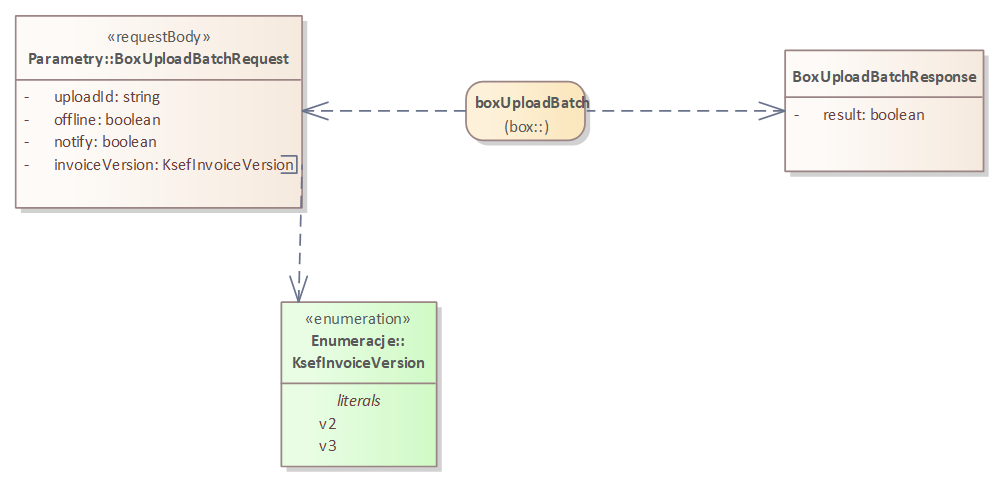
Diagram: boxUploadBatch
BoxUploadBatchRequest
The class is described in the chapter BoxUploadBatchRequest.
BoxUploadBatchResponse
The class represents a response informing about the status of a batch of invoices sent to the KSeF Gateway (black-box).
result : boolean – Attribute value true, informs about the correct receipt of the entire invoice package by the KSeF Gateway (black-box).
boxUploadBatchStatus
This method allows you to check the status of a batch of invoices sent to KSeF. Click on the operation name to go to Swagger UI.
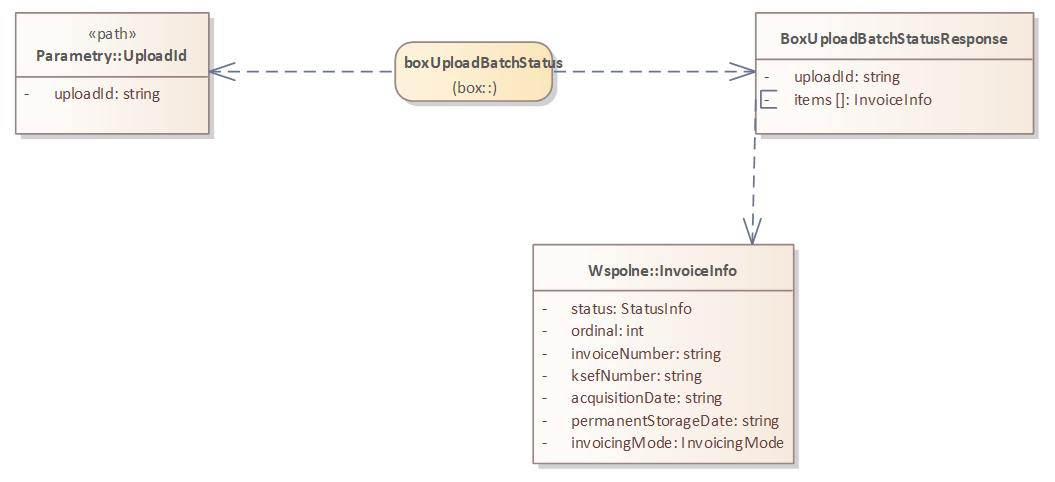
Diagram: boxUploadBatchStatus
UploadId
The class is described in the chapter UploadId.
BoxUploadBatchStatusResponse
The class represents a response informing about the status of invoices sent to KSeF.
uploadId : string – Unique identifier of the invoice batch being sent.
invoiceInfo : InvoiceInfo – This attribute contains tables of information detailing the status of sent invoices. This complex type is described in the chapter InvoiceInfo.
sessionId: string – Attribute described in the chapter SessionId.
upo : string – The attribute contains a UPO, i.e. a base64 encoded XML file.
boxDownloadInvoices
This method allows you to define and send to KSeF search criteria for which invoices will be returned. Click on the operation name to go to Swagger UI.
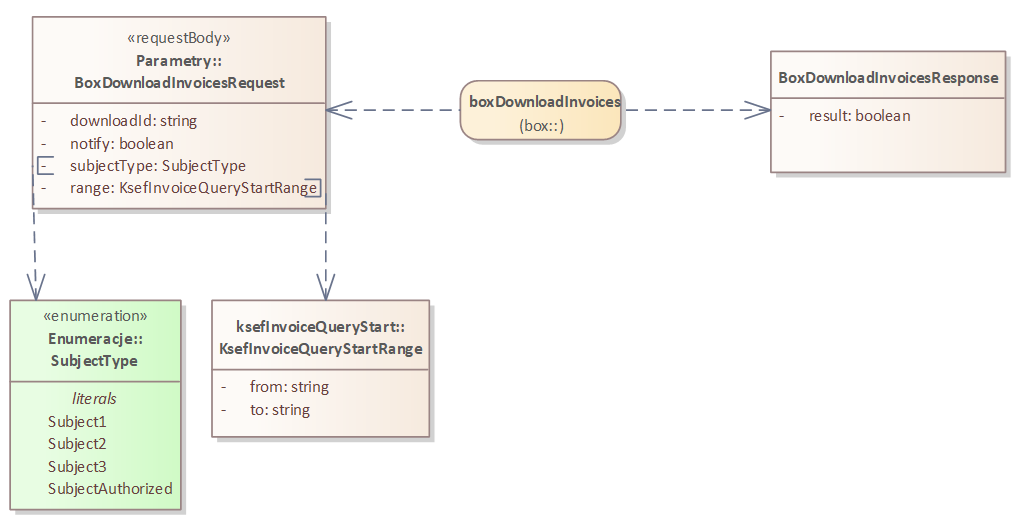
Diagram: boxDownloadInvoices
BoxDownloadInvoicesRequest
The class is described in the chapter BoxDownloadInvoicesRequest.
BoxDownloadInvoicesResponse
The class represents a response informing about the status of the query sent to KSeF.
result : boolean – Attribute value true, informs about the correct submission of the KSeF invoice search request to the KSeF Gateway (black-box).
boxDownloadInvoicesResult
The method allows you to download from KSeF all found invoices that meet the search criteria defined in the request BoxDownloadInvoicesRequestClick on the name of the operation to go to Swagger UI.

Diagram: boxDownloadInvoicesResult
DownloadId
The class is described in the chapter DownloadId.
ApplicationZipContent
The class is described in the chapter ApplicationZipContent.
Parameters
The chapter contains a summary of all parameters by type:
- path – parameter passed in the URL path
- requestBody – parameter passed in the request body
Path
Parameters for calling the operation included in the path.
UploadId
The class represents the transmitted identifier of an invoice or batch of invoices.
uploadId : string – Unique identifier of the invoice or invoice batch being sent.
DownloadId
The class represents the uploaded invoice search identifier.
downloadId : string – Unique invoice search identifier, generated when sending the request BoxDownloadInvoicesRequest, and used as an input parameter in the operation boxDownloadInvoicesResult.
RequestBody
Parameters of the requestBody type passed in the request body.
BoxUploadInvoiceRequest
The class describes the data necessary to send a structured invoice to KSeF.
uploadId : string – ID of the invoice being sent.
offline : boolean – Value true attribute means that an invoice generated in offline24 mode is being sent.
notify : boolean – Value true attribute means that the user has defined a webhook in the user panel to which the system should send information in the event of information about the status of sent invoices appearing in KSeF.
upo : boolean – Value true attribute that operations boxUploadInvoiceStatus and boxUploadBatchStatus they will immediately return the collective Official Confirmation of Receipt (UPO) with the result,
invoiceData : string – The invoice being sent, compliant with the applicable FA(2) or FA(3) scheme, encoded using Base64.
BoxUploadBatchRequest
The class describes the data necessary to send the entire package of structured invoices to KSeF.
uploadId : string – ID of the invoice being sent.
offline : boolean – Value true attribute means that an invoice generated in offline24 mode is being sent.
notify : boolean – Value true attribute means that the user has defined a webhook in the user panel to which the system should send information in the event of information about the status of sent invoices appearing in KSeF.
upo : boolean – Value true attribute that operations boxUploadInvoiceStatus and boxUploadBatchStatus they will immediately return the collective Official Confirmation of Receipt (UPO) with the result,
invoiceVersion : KsefInvoiceVersion – This attribute contains information about the schema of the invoices being sent. All invoices must be of the same schema. Content type was described in the chapter KsefInvoiceVersion.
BoxDownloadInvoicesRequest
The class represents a request that allows defining parameters for searching invoices in KSeF.
downloadId : string – Generated unique search identifier, which is used in the method boxDownloadInvoicesResult possible download of found invoices.
notify : boolean – Value true attribute means that the user has defined a webhook in the user panel to which the system should send information in the event of information about the status of sent invoices appearing in KSeF.
subjectType : SubjectType – Specifying what type of invoice we are searching for. The content type is described in the chapter SubjectType.
range : KsefInvoiceQueryStartRange – Select the period for which invoices are to be searched. Content type described in the chapter KsefInvoiceQueryStartRange.